> For the complete documentation index, see [llms.txt](https://support.skylum.com/llms.txt). Markdown versions of documentation pages are available by appending `.md` to page URLs; this page is available as [Markdown](https://support.skylum.com/luminar-for-web/welcome-to-your-learning-journey.md).
# Welcome to Your Learning Journey
Need help with Luminar for Desktop? Browse our knowledge base, get answers to common questions, and contact support for personalized assistance.
Welcome to Luminar on Web!
Photography doesn’t always happen where your main computer is. You may be traveling, teaching a workshop, visiting family, or simply working from somewhere different.
The location changes. The device may change. Your creativity doesn’t have to stop.
That’s what this is really about. Giving you the freedom to work on a photograph when the idea is there, instead of waiting until you’re back at your usual setup.
Open a browser, sign in, and continue working. Start on your phone, move to a larger screen, or return to your desktop without treating each device as a new beginning.
Your photography follows you.
This manual walks you through the connected workflow and explains what each tool does, when to use it, and how to make creative choices without over-editing.
👇 **Here's what you'll find inside:**
***
### A Few Cool Things You Should Know About This Guide 💡
This isn’t just any guide — we’ve built in a few features to make your experience smoother and more enjoyable:
✨ **AI-Powered Search**\
Need help fast? Just type your question into the search bar at the top — our smart search tool will do the rest. It's quick, accurate, and always ready to assist.
***
🌙 **Light or Dark Mode – Your Choice!**\
Choose the look that’s easiest on your eyes. You can easily switch between light and dark modes in the bottom right corner.
***
🎥 **Step-by-Step Video Help**\
Many of our articles include short videos you can follow in real time. Just hit play and watch the magic unfold — and yep, most of them are available with translations too! Notice that many videos are built in interactive mode, where you need to click through each step in the video.
***
📄 **Download as PDF**\
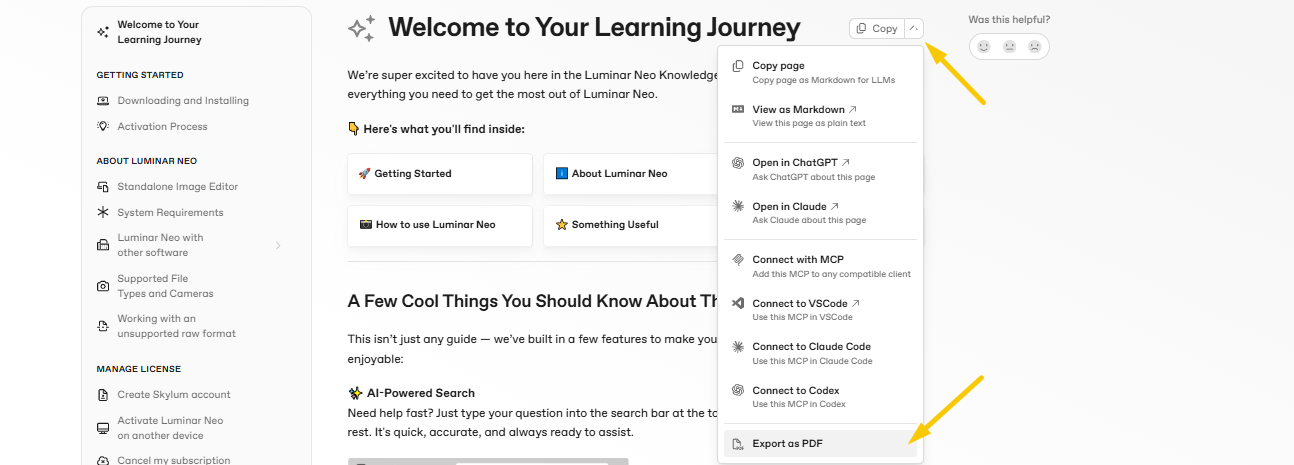
Want to keep the guide offline or share it with someone? You can download either the full guide or just a single page as a PDF — super handy for quick reference.
***
📩 **Need More Help? Contact Support**\
Still stuck? No worries. Just click the support button in the top right corner and our team will jump in to help you out.
***
💬 **Tell Us What You Think**\
We’re always looking to improve! If you find something helpful (or not so helpful), leave us a quick reaction and comment using the smiley icon at the bottom of any article.
***
Thanks again for being here — we’re so glad to be part of your creative journey 💛\
Now, let’s get exploring!
---
# Agent Instructions
This documentation is published with GitBook. GitBook is the documentation platform designed so that both humans and AI agents can read, navigate, and reason over technical content effectively. Learn more at gitbook.com.
## Querying This Documentation
If you need additional information that is not directly available in this page, you can query the documentation by asking a question.
Perform an HTTP GET request on the following URL with the `ask` and `goal` query parameters:
```
GET https://support.skylum.com/luminar-for-web/welcome-to-your-learning-journey.md?ask=&goal=
```
`ask` is the immediate question: it should be specific, self-contained, and written in natural language.
`goal` is what the user is ultimately trying to achieve, the reason they need the answer. Sharing it helps GitBook give you a better, more relevant answer. A goal is most helpful when it describes the outcome the user wants rather than restating the question. For example, with `ask=how do I create an API token`, a goal like `automate deployments from our CI pipeline` lets GitBook tailor the answer to that use case.
The response will contain a direct answer to the question and relevant excerpts and sources from the documentation.
Use this mechanism when the answer is not explicitly present in the current page, you need clarification or additional context, or you want to retrieve related documentation sections.