# Welcome to Your Learning Journey

We’re super excited to have you here in the Luminar Neo Knowledge Hub — your go-to space for everything you need to get the most out of Luminar Neo.&#x20;

👇 **Here's what you'll find inside:**

<table data-view="cards"><thead><tr><th></th><th data-hidden data-card-target data-type="content-ref"></th></tr></thead><tbody><tr><td><span data-gb-custom-inline data-tag="emoji" data-code="1f680">🚀</span> <strong>Getting Started</strong></td><td><a href="/pages/AKu31N013rJgDN1lyCHZ">/pages/AKu31N013rJgDN1lyCHZ</a></td></tr><tr><td>ℹ️ <strong>About Luminar Neo</strong></td><td><a href="/pages/K69d1s2ML4m9y0BXvQzk">/pages/K69d1s2ML4m9y0BXvQzk</a></td></tr><tr><td>💻 <strong>Manage License</strong></td><td><a href="/pages/dwxLPp1wa3JCx8W0QtEo">/pages/dwxLPp1wa3JCx8W0QtEo</a></td></tr><tr><td>📸 <strong>How to use Luminar Neo</strong></td><td><a href="/pages/Zl9Rv6Q6lVW3LgcIDDRR">/pages/Zl9Rv6Q6lVW3LgcIDDRR</a></td></tr><tr><td>⭐️ <strong>Something Useful</strong></td><td><a href="/pages/4cOXIS48dxZGuz7U1OjS">/pages/4cOXIS48dxZGuz7U1OjS</a></td></tr><tr><td>🛠️ <strong>Troubleshooting</strong></td><td><a href="/pages/jNJNBcgnrDL8sBrGhkpB">/pages/jNJNBcgnrDL8sBrGhkpB</a></td></tr></tbody></table>

***

### A Few Cool Things You Should Know About This Guide 💡

This isn’t just any guide — we’ve built in a few features to make your experience smoother and more enjoyable:

✨ **AI-Powered Search**\
Need help fast? Just type your question into the search bar at the top — our smart search tool will do the rest. It's quick, accurate, and always ready to assist.

<div align="left"><figure><img src="/files/8FQCUjUH4fNRwPBjIgDL" alt="" width="375"><figcaption></figcaption></figure></div>

***

🌙 **Light or Dark Mode – Your Choice!**\
Choose the look that’s easiest on your eyes. You can easily switch between light and dark modes in the bottom right corner.

<div align="left"><figure><img src="/files/qQWUXVoxWQffIww9Nvl6" alt="" width="375"><figcaption></figcaption></figure></div>

***

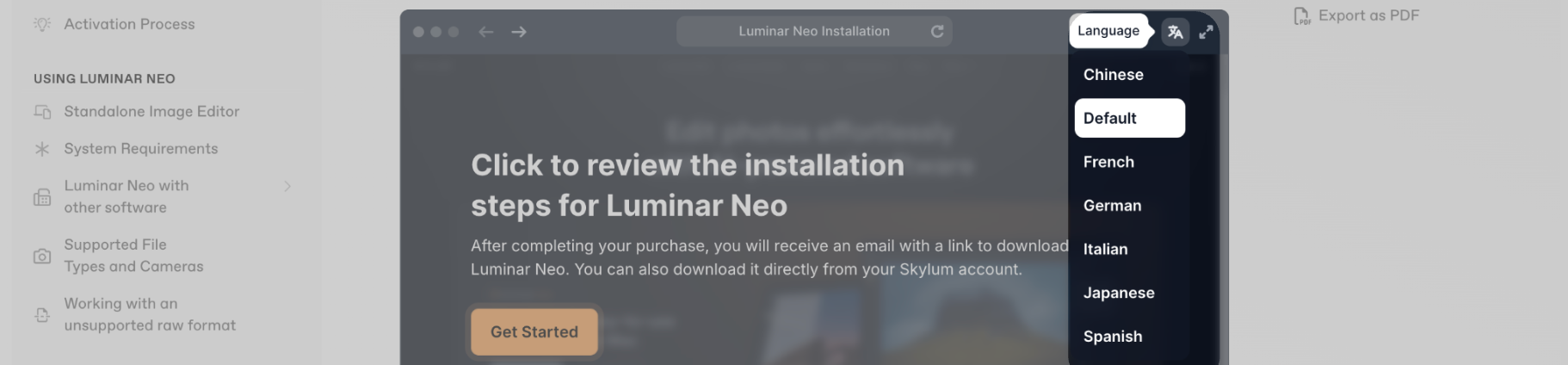
🎥 **Step-by-Step Video Help**\
Many of our articles include short videos you can follow in real time. Just hit play and watch the magic unfold — and yep, most of them are available with translations too! Notice that many videos are built in interactive mode, where you need to click through each step in the video.

<div align="left"><figure><img src="/files/CWttJa1yiIwWsD0OvstH" alt="" width="375"><figcaption></figcaption></figure></div>

***

📄 **Download as PDF**\
Want to keep the guide offline or share it with someone? You can download either the full guide or just a single page as a PDF — super handy for quick reference.

<div align="left"><figure><img src="/files/v0kA6D0rsu91SPjvk2qL" alt="" width="375"><figcaption></figcaption></figure></div>

***

📩 **Need More Help? Contact Support**\
Still stuck? No worries. Just click the support button in the top right corner and our team will jump in to help you out.

<div align="left"><figure><img src="/files/UzMT4MbkiUzwgUF1VC2y" alt="" width="375"><figcaption></figcaption></figure></div>

***

💬 **Tell Us What You Think**\
We’re always looking to improve! If you find something helpful (or not so helpful), leave us a quick reaction and comment using the smiley icon at the bottom of any article.

<div align="left"><figure><img src="/files/BeuuTimf6UjkCHedcm4f" alt="" width="375"><figcaption></figcaption></figure></div>

***

Thanks again for being here — we’re so glad to be part of your creative journey 💛\
Now, let’s get exploring!


---

# Agent Instructions: Querying This Documentation

If you need additional information that is not directly available in this page, you can query the documentation dynamically by asking a question.

Perform an HTTP GET request on the current page URL with the `ask` query parameter:

```
GET https://support.skylum.com/welcome-to-your-learning-journey.md?ask=<question>
```

The question should be specific, self-contained, and written in natural language.
The response will contain a direct answer to the question and relevant excerpts and sources from the documentation.

Use this mechanism when the answer is not explicitly present in the current page, you need clarification or additional context, or you want to retrieve related documentation sections.